


ROGUELIKE DECKBUILDER
PLICA
Play the same suit in a row and your cards fold stronger.
The Blank King is erasing the Great Book. Climb 51 card battles across five hand-coloured acts to take the last page back.

Run a tiny sakura-street shop of stationery & sweets.
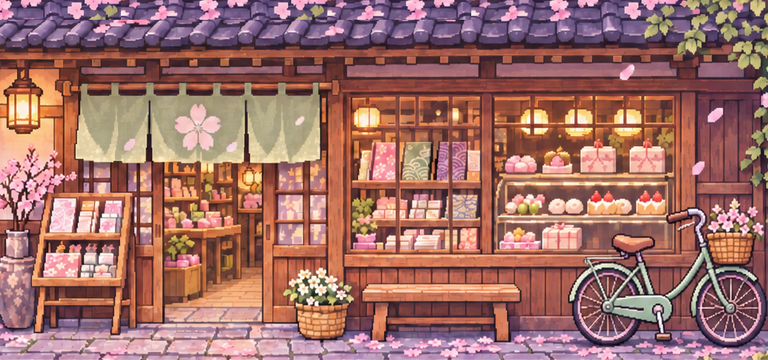
Take over a tiny shop on a quiet Japanese street lined with cherry trees. Each morning you open the doors under the noren; customers drift in, browse your display tables, pick up notebooks, brush pens and wagashi they like at a fair price, and queue at your counter to pay.
When the shop closes, settle in at the evening desk by lamplight and work through it step by step with Next and Back: read the day’s report, choose what goes on display, set tomorrow’s prices, order fresh stock and decorations from your suppliers, and keep up with the rent and electricity bills.
Save carefully and the shop grows: open the Blossom Annex, add display tables and storage, and decorate, as the calendar turns from spring blossoms to summer heat, autumn leaves and winter snow.
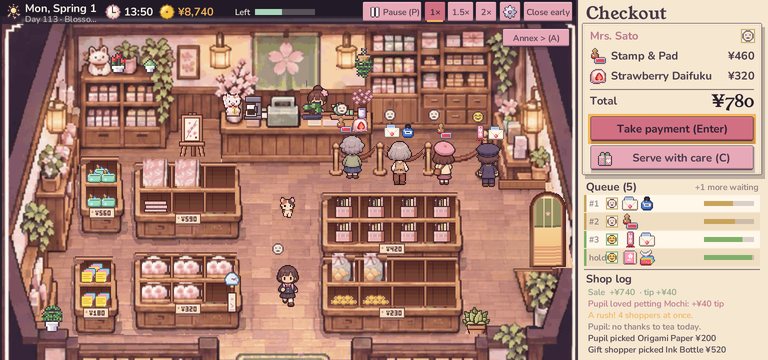
Stock 42 products from five suppliers, each with its own order and delivery: stationery, pens and origami from Hanamachi, dorayaki, dango and kasutera from Kotobuki, sencha, matcha and drip coffee from Tsubaki Tea & Coffee, and ikebana, bonsai and seasonal flowers from Komorebi Florist once the annex opens. Arrange the displays and set the day’s prices each morning or at the evening desk, and press R to restock a table that sells out. Make the shopkeeper yours too: in Settings, pick their hair, top, apron and flower-pin colours.
33 different neighbours drop by, from a schoolgirl with a pink backpack, a florist and a violinist to a grandma, a train conductor and a bike courier, and now and then a rush of four or five shoppers arrives at once. They browse, weigh your prices, pick favourites and leave if the queue is too slow. When a sale slips away, an icon tells you why: too expensive, sold out, not on display, gave up waiting or shop closed. Every shopper shows their mood, from happy to upset: prices, waiting, the weather, a cup of tea and the shop pet all play a part. Eight named regulars, like Mrs. Sato who loves wagashi and Kenji who comes for pens, visit on their usual days, earn friendship hearts when you serve them well, and may tip, bring friends or leave a thank-you note on the morning card. Happy days grow the shop’s reputation and bring more visitors.
When a customer comes to pay, the shopkeeper walks over to the register. Press C for an optional little minigame, picked to suit the customer: wrap a gift, ring up the basket on the register keypad, time a thankful bow, count the change, pack the bag, pour a cup of tea, stamp a loyalty card or trace a thank-you note. Do it well for a tip and a more patient queue, or skip it and the sale still goes through. Either way, the shopkeeper bows after every sale. Once you own a teapot set from Tsubaki Tea & Coffee (and a coffee machine after the annex), offer a cup of tea, a coffee or a snack after each sale with T, O or S. Cold, rainy and snowy days bring more takers, summer brings iced tea, and pouring it yourself earns a little extra tip.
An animated shop front each morning, a busy shop floor by day and a cozy evening desk at night, where you step through the report, displays and pricing, suppliers, and bills and expansion.
A full calendar of seasons with daily weather that changes the street and who comes in. Shoppers dress for the weather, from straw hats and fans to scarves and beanies, and on rainy days they leave their umbrellas in a bucket by the door. Some storms bring thunder and lightning. Each season has its own treat to stock, such as sakura mochi in spring or chestnut yokan in autumn.
The whole shop is drawn in rich detail, with wooden shelves, lanterns and tables that show their stock in bays with little price cards. Pay the bills, save up and open the annex, which sits boarded up with warm light glowing through the boards until you do. Once it’s open it’s a room of its own: press A and the view slides over to it. Grow to as many as 12 display tables: two more in the main room and up to six in the annex. Then add stockroom shelves and a storage loft for more stock, each built overnight.
Hinata Living & Decor sells 17 decorations and plants for the shop, some in a choice of colours, like a lucky cat in white, gold or black. Every piece adds charm, and a charming shop earns bigger tips. Then decorate your way: press Decorate on the morning card to drag each piece to the spot you like and rearrange the display tables, in both rooms. The game keeps every aisle clear, and your layout travels with Blossom Sync.
After your first full year, a little visitor comes to the door. Adopt a calico cat or a Shiba puppy and give it a name. It wanders the shop by day, and customers who stop to pet it leave a little extra tip.
At the end of each day, Share today makes a card with your sales, tips, best seller and shop charm, drawn in the game’s own style. Save it or send it to a friend.
14 cozy original tracks, two each for spring, summer, autumn, winter, rain, morning and evening, from Petal Path to Moonlit Abacus. Let it follow the season and weather and alternate by day, pick one track or shuffle, and set music and sound-effect volumes separately.
A new shop opens with a short How to play guide, and you can reopen it any time from Settings. Set the pace while you trade: pause, 1×, 1.5× or 2×, and the game remembers your choice. Relaxed mode removes the time pressure, Reduced Motion calms the animation, and there’s full mouse and keyboard control. On tablets the shop fills the screen.
Your shop saves on your device and is never overwritten by mistake. After your first visit, the game plays offline. Blossom Sync gives your shop a private code, so you can carry it to another device.

Arrange your displays and prices, then press Open shop.
Customers browse and queue. Ring up each basket with Take payment, or Serve with care for a tip.
Step through the desk with Next and Back: read the report, swap displays and reprice, order stock and decor, check the bills, then Start next day.
Save up for the annex, more tables and a cozier shop, and watch it grow through the seasons.
From the morning shop front to the evening desk. Select a screen to see it full size.


Captured from the current build.

The game’s icon. Look for it in the cabinet.
The lanterns are lit and the first customers are on their way.
Play the same suit in a row and your cards fold stronger.
The Blank King is erasing the Great Book. Climb 51 card battles across five hand-coloured acts to take the last page back.

Cook live with a tiny capybara, answer chat requests and catch Big Likes.
247 recipes from 29 countries, cooked step by step while the chat watches. By Julia.

Swipe right to accept, left to refuse. Find the Moon Sword and defeat the Blood Moon King.
The Elder presses a broken hilt into your hands. Find the sword’s three shards across ten regions and five acts before the Blood Moon King wakes.
A Plica Studios game. Fonts: Young Serif and Nunito (SIL OFL). Music and sound effects are original, generated for the game.